Free Express Shipping


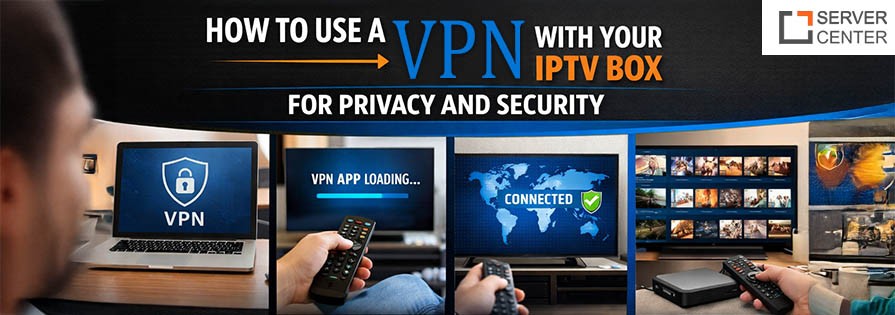
In today’s digital age, privacy and security are more important than ever. As more people turn to IPTV boxes for streaming their favorite content, the need for protecting personal data has increased. The growing popularity of Internet Protocol Television (IPTV) services has made users vulnerable to a range of potential online threats, including hackers, data tracking, and geo-restrictions. That’s where a Virtual Private Network (VPN) comes in. This blog post will guide you on how to set up a VPN for your IPTV box, enhance your online privacy, and make your streaming experience safer.
Why Use a VPN with Your IPTV Box?
A VPN works by encrypting your internet connection, making it difficult for third parties to track your online activities. Whether you're using a smart TV, set-top box, or a streaming device, a VPN setup for an IPTV box offers a variety of benefits that will improve both your security and privacy while streaming IPTV services.
- Bypass Geo-restrictions
Many IPTV services restrict content based on your geographical location. For instance, certain channels or shows may not be available in your region. A VPN allows you to change your virtual location, making it appear as if you are in a different country, thus helping you access content that would otherwise be unavailable. - Enhanced Security: Using a VPN ensures that your data is encrypted and your browsing activities are anonymous. This is particularly important when using an IPTV box, which is often connected to your home network. Without proper encryption, your sensitive data could be at risk of being intercepted by malicious parties.
- Protect Your Privacy: IPTV services, like many online platforms, often track your viewing habits. A VPN prevents these services from tracking your activity by masking your IP address, ensuring that your online behavior stays private.
- Avoid ISP Throttling: Some Internet Service Providers (ISPs) intentionally slow down your connection when you stream content. A VPN hides your traffic from your ISP, making it less likely that they’ll throttle your connection speed when streaming IPTV content.
How to Set Up a VPN on Your IPTV Box
Setting up a VPN on your IPTV box may seem complicated at first, but with the right steps, it’s a relatively simple process. Here’s a step-by-step guide to getting started:
Step 1: Choose a Reliable VPN Provider
Before you can set up a VPN for your IPTV box, you need to choose a VPN provider. There are numerous VPN services available, but you should focus on those that offer strong security features, high-speed connections, and a broad server network. Look for a VPN list for an IPTV box that includes well-known names with positive reviews and a clear commitment to user privacy.
Step 2: Download the VPN App
Many VPN providers offer apps for Android or iOS devices, and some even have dedicated apps for streaming boxes like the Amazon Fire TV Stick or Android TV. If your IPTV box supports these apps, you can simply download and install them directly. If the box does not have a native app, you may need to install the VPN on your router or use a different device to connect to the VPN.
Step 3: Install the VPN on Your IPTV Box
If your device supports app installation, simply follow the installation instructions provided by the VPN service. If not, you will need to configure your router to route your IPTV box's connection through the VPN. This can usually be done by accessing your router’s settings and entering the VPN connection details.
Step 4: Log into the VPN App
After installing the VPN on your IPTV box, open the app and log in with your credentials. Most VPN apps have a simple user interface, making it easy to connect to a secure server. Select a server in the location where you want to appear to be browsing from. If you're looking to access geo-restricted content, make sure to choose a server in the country that offers the content you want.
Step 5: Enjoy Safe Streaming
Once the VPN is connected, you can start streaming your favorite IPTV services. The VPN will protect your data, hide your IP address, and enable access to content from around the world.
Best VPN Services for IPTV Boxes
Choosing the right VPN for your IPTV box can make a huge difference in your streaming experience. Here are some of the top VPNs recommended for IPTV streaming:
- ExpressVPN: Known for its fast speeds and strong security protocols, ExpressVPN is a top choice for IPTV services. It supports a wide range of devices, including routers, ensuring that your IPTV box can be fully secured.
- NordVPN: NordVPN offers a large server network and excellent privacy features, including double encryption for extra protection. It’s a great choice for users who want a reliable and secure VPN setup for an IPTV box.
- CyberGhost: With a user-friendly interface and optimized servers for streaming, CyberGhost is perfect for beginners. It also supports devices such as Android TV boxes, making it a solid choice for IPTV users.
- Surfshark: Surfshark offers unlimited device connections and a strong no-logs policy. It’s perfect for families or people who want to secure multiple devices at once, including your IPTV box.
- Private Internet Access (PIA): PIA has excellent privacy features and fast speeds, making it a good choice for streaming IPTV content securely. It also allows for flexible configurations on various devices.
Troubleshooting VPN Issues with IPTV Boxes
While using a VPN with your IPTV box generally improves your streaming experience, there may be occasional issues. Here’s how to resolve some common problems:
- Slow Streaming Speeds: VPNs can sometimes slow down your connection, especially if you are connected to a distant server. Try switching to a server that is closer to your location to improve speeds.
- Geo-restrictions Not Bypassed: Some IPTV services may block VPN traffic. Try switching to a different VPN server or contact the VPN provider’s support for further assistance.
- VPN Not Connecting on IPTV Box: If the VPN app fails to connect, ensure that your device is compatible with the VPN service, or check for any software updates. Rebooting the device or router can also help resolve connectivity issues.
Conclusion:
Using a VPN with your IPTV box is one of the best ways to ensure a safe, private, and uninterrupted streaming experience. By following the simple setup steps and choosing a trusted VPN provider, you can enhance your security, bypass geo-restrictions, and protect your data from prying eyes. As you enjoy a world of content from your IPTV services, the peace of mind that comes with using a VPN is invaluable. Stay secure, stay private, and stream with confidence.
Frequently Asked Questions:
1. Why should I use a VPN with my IPTV box?
Using a VPN with your IPTV box enhances your privacy by encrypting your internet connection, hides your IP address, and helps you bypass geo-restrictions for better content access.
2. How do I set up a VPN on my IPTV box?
To set up a VPN on your IPTV box, choose a VPN provider, install their app (if available), or configure your router to route traffic through the VPN. Once set up, connect to a secure server and enjoy streaming.
3. Will a VPN slow down my IPTV streaming?
A VPN can sometimes reduce streaming speed due to the encryption process. However, selecting a server closer to your location and using a high-speed VPN service can minimize the impact on your streaming quality.
4. Can a VPN help me access geo-restricted IPTV content?
Yes, a VPN allows you to change your virtual location, enabling access to content that may be blocked or unavailable in your region. Simply connect to a server in the desired location.
5. Is it safe to use a free VPN for my IPTV box?
While free VPNs can offer basic protection, they often come with limitations like slower speeds, less security, and data logging. It's recommended to choose a reliable paid VPN for better security and performance.